
AI Food and Product Photography vs. Real Photos: Why the Best Results Start With a Real Shoot
Updated: Sep 24
By Danielle Goodman

AI tools are changing how brands create visual content. They can clean up backgrounds, extend scenes, adapt images for different formats, support seasonal campaigns, and help brands get more use from one strong shoot.
That can be valuable for restaurants, food businesses, product brands, and ecommerce sellers. But when an image represents a real dish someone will order or a real product someone will buy, the starting point still matters.
The most important distinction is this:
AI enhancement is not the same as AI invention.
Enhancement starts with the real dish or product and makes the image more useful. Invention creates something that may look polished but may not accurately represent what a customer is ordering, buying, or trusting.
For commercial photography, an image is not just decoration. It is part of the promise a brand makes to a customer. A food photo shapes what someone expects to receive. A product photo communicates color, texture, scale, packaging, material, and quality.
The strongest and most trustworthy workflow starts with a real photo of the real thing.
What restaurants and product brands should know
Restaurants should not use fully AI-generated food photos for menus, delivery apps, or ordering pages. Food photography should show the real dish.
Product brands should use real photography wherever customers rely on accurate color, scale, texture, labels, packaging, materials, or product details.
AI tools are most useful after a real shoot for careful cleanup, scene extension, formatting, crops, and controlled variations that preserve the real dish or product.
AI can create an image. It cannot guarantee accuracy.
AI can make an attractive picture. That is no longer the interesting part.
The more important question is whether the image needs to represent something real: a dish someone will order, a product someone will buy, or a brand experience someone will expect.
AI tools can support parts of the production process. They can assist with cleanup, background changes, scene extension, formatting, and controlled variations. But that is different from replacing the source image.
If an image is being used to show the exact dish someone will receive, sell the exact product someone will buy, or represent packaging, color, texture, portion, material, or scale, it needs to stay grounded in reality.
That is where real photography still matters.
Where AI helps after a real food or product shoot
The best use of AI in commercial imagery is not as a shortcut around reality. It is a way to get more value from accurate source images.
A strong shoot can become more than a folder of final photos. It can become a flexible visual library that supports:
website and landing-page images
menus and delivery platforms
ecommerce listings and product pages
social media crops and Reel covers
advertising and campaign graphics
Google Business Profile updates
email graphics and web banners
carefully controlled seasonal variations
The underlying dish or product stays real. The image becomes more adaptable.
That is the right way to think about AI tools: not as a replacement for the real subject, but as a way to create more useful content from a strong visual foundation.
Food photography should show real food
Food is emotional. People eat with their eyes. A strong image can make someone crave a dish before they read its description.
But food photos also create expectations.
If someone orders from a photo, they expect the real item to feel connected to the image. It does not need to match down to every crumb, but it needs to be honest.
That is why I do not believe restaurants should use fully AI-generated food photos for menus, delivery apps, or ordering pages. Those images should show the actual dish a guest can expect to receive.
On a food shoot, I pay attention to the details that define the actual dish: the amount of each ingredient, the size and shape of the portion, the texture of the sauce, the browning of the crust, the height of the sandwich, the color under real light, and even imperfections when they are part of what makes the food look real.
Those are not minor visual details. They are part of what the customer is being promised.
A real example: Rise & Puff
Rise & Puff hired Danielle Imagery to photograph its frozen quesadillas because the team did not want the food to look artificially perfect or too polished to be believable. They wanted the food to look naturally delicious, with a golden-brown, crisp exterior and real cheese stretching, melting, and dripping as it does when the quesadilla is heated and ready to eat.
The goal was not to create a flawless version of the food. It was to make the real product look as appealing as it genuinely is.
After the shoot, I experimented with AI on one of the quesadilla images. The generated version changed the quesadilla's shape, color, texture, and browning. It became too glossy, almost plastic-looking, and the cheese no longer felt natural.

The real quesadilla keeps its natural browning and texture. In the AI version, the cheese turns brighter, glossier, and almost plastic-looking.
The result may have looked polished at first glance, but it was no longer an accurate image of the food Rise & Puff actually sells.

That experiment reinforced the line I draw in my own work: I may use AI to support or add elements in the background, but I do not use AI to alter the food itself.
AI tools can make food look glossier, fuller, more symmetrical, more colorful, and more abundant than the real dish. In research summarized by Oxford University, participants who were not told how the images were created consistently rated the AI-generated versions as significantly more appetizing than the real food photographs.
That visual appeal is exactly why the distinction matters. If the dish someone receives looks meaningfully different, the image can create disappointment rather than desire.
A guest who feels misled may not care whether the image was AI-generated, taken from stock, over-styled, or poorly edited. They only know the food did not match what they expected.
The better approach is to photograph the real dish first, refine the image carefully, and use AI tools only when they help the final photo without changing what the guest should expect to receive. That principle is consistent with the platforms closest to the ordering decision. DoorDash's AI Retouch guidance says the tool keeps the original dish while cleaning up the background, lighting, and sharpness. Uber Eats' menu photo guidelines require item photos to accurately represent a single item from the restaurant's menu.
Same dish. Better image. Not a fictional plate.
Product photography is about trust, not just aesthetics
Good product photography should make a product desirable, but it also needs to make the product clear.
A shopper wants to understand what the product actually looks like. They want to see its color, texture, size, packaging, finish, materials, components, and overall feel before they buy.
A real product photo helps answer those questions.
This is especially important in ecommerce because the customer cannot pick up the product or inspect it in person. The photograph has to do some of the work normally performed by touch, scale, and physical examination. Shopify's ecommerce photography guidance makes the same practical point: product photos help potential customers envision what a product looks and feels like in real life.
On a product shoot, accuracy begins before editing. I control the lighting, focus, angle, texture, size, and any imperfections that are important to the product. For some subjects, I use focus stacking so the necessary details remain sharp across the image.
AI can introduce errors that are easy to overlook but commercially important. It may alter labels, fonts, color, shape, material, texture, size, or proportion.
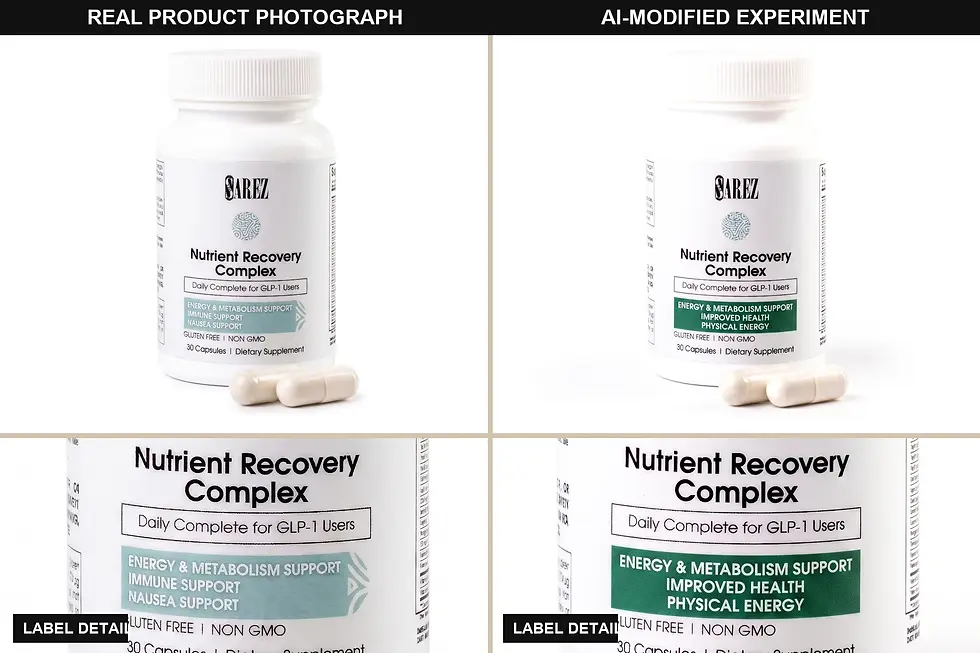
It can also distort scale indirectly. If AI generates a prop that is too large or too small beside the product, the customer may leave with the wrong impression of the product's actual size.

Those details are not cosmetic. They are part of the information the photograph communicates.
AI tools can help create a polished surrounding scene. But if the product itself is inaccurate, the image can undermine confidence instead of building it. Google Merchant Center's product image guidance calls for images that accurately display the product and warns against generic images or illustrations that do not show the actual item.
A strong commercial shoot matters because a photographer is doing more than polishing the image. The photographer is controlling light, color, reflection, shape, crop, texture, and detail so the product feels both attractive and believable.
The risk starts when AI invents details customers rely on
The risk with AI food and product imagery begins when an image stops enhancing reality and starts changing it.
For food, AI might:
increase the portion
add or remove ingredients
alter the texture
create unrealistic browning, melting, or gloss
change the garnish or plating
make the dish look fuller or more elaborate than what is served
For products, AI might:
remove important product details
alter label text or fonts
distort a logo
shift the color
change the shape, proportion, or scale
make the material look more premium
smooth or exaggerate the texture
change the packaging, finish, or components
Some of these changes are obvious. Others are subtle. Either way, they matter when the image shapes what a customer expects to receive.
Customers do not experience an image as a creative AI experiment. They experience it as a representation of what they are about to order or buy.
Use AI tools to support the real thing. Do not let them invent the thing.
A practical framework for AI image use
The closer an image is to the buying decision, the more accurate it needs to be.
Use case | Trust and accuracy risk | Best approach |
Internal concepts or mood boards | Lower | Use AI for internal planning, not as a customer-facing representation of the real dish or product. |
Social crops or format variations from a real shoot | Lower | Resize, extend, or adapt the image while preserving the real subject. |
Website banners or campaign graphics | Medium | AI may help with backgrounds or layout, but the dish or product should remain accurate. |
Seasonal campaign variations | Medium | Create controlled variations only after an accurate base image exists. |
Restaurant menu or ordering-page photos | High | Photograph the real dish. Do not invent ingredients, portions, textures, or plating. |
Delivery-app images | High | Use real food photography. Limit AI-assisted changes to cleanup that preserves the dish. |
Main ecommerce product images | High | Use real product photography. Preserve color, scale, labels, texture, finish, and packaging. |
Packaging, label, ingredient, material, or texture closeups | High | Keep the real details intact and review every AI-assisted image carefully. |
This principle also aligns with FTC truth-in-advertising guidance, which says advertising must be truthful and non-deceptive and evaluates what an ad communicates through both words and pictures.
How I approach AI-assisted food and product photography
My goal is to create the strongest possible image in camera first.
That means controlling lighting, focus, angle, texture, scale, composition, and the details that matter before any AI tool enters the process. Sometimes that also means using techniques such as focus stacking to preserve sharpness across a product.
I want the core image to stand on its own. AI should not be needed to rescue the photograph.
1. Photograph the real dish or product
The work begins with what is actually there: the real food, product, packaging, texture, material, and brand. I capture the subject cleanly and intentionally so the core image can stand on its own.
2. Build the accurate source images
The images closest to the buying decision need to stay closest to reality. That includes menu and delivery-app photos, main ecommerce images, product-detail photographs, packaging shots, website images, and anything customers use to decide what to order or buy.
3. Give every AI-assisted change a clear purpose
AI should not be used simply because it is available. It may be useful for careful cleanup, background extension, format changes, social crops, web banners, or controlled campaign variations. But it should have a specific job and should not make the dish or product less accurate.
My boundary is clear: I may use AI to add or adapt elements in the background, but I do not use it to alter the dish or product itself.
4. Compare the final image with the real thing
Before an AI-assisted image is used, I want to know:
Did the color change?
Did the label, font, or logo change?
Did the texture or material change?
Did the portion, ingredients, shape, or browning change?
Did the packaging, proportion, or scale change?
Does the image create an expectation the brand cannot meet?
If the answer is yes, the image needs to be corrected or kept as an internal concept.
5. Keep taste and judgment in the process
AI can generate options quickly. It cannot decide which option is accurate, tasteful, restrained, and right for the brand.
Commercial photography is not only about choosing camera settings and pressing the shutter. It is about lighting, focus, styling, timing, composition, color, restraint, brand fit, and knowing what should not be changed.
That judgment matters even more when software can quickly generate something that looks polished but is not true.
Why the real source shoot still matters
A strong source shoot does two jobs at once.
First, it creates the accurate images a restaurant or product brand needs for the places where truth matters most: menus, delivery apps, ecommerce listings, packaging, websites, and campaigns.
Second, it gives any later creative tools better material to work with.
A strong photograph provides accurate shape, texture, label detail, color, lighting, scale, and context. That makes it easier to create useful variations without drifting away from the real dish or product.
A weak source image or fully invented prompt gives AI more room to guess. And when AI guesses, it may quietly misrepresent the brand.
The better the original shoot, the more useful every final image can be and the more creative flexibility the brand has later.
The bottom line
AI tools are part of the visual landscape now. But for food and product photography, the source of truth should still be the real thing.
Food photography should show real food. Product photography should show the real product.
The image should be beautiful, but it should also be honest. It should help people understand what they are ordering, buying, tasting, or trusting. It should make the real dish or product look its best, not replace it with something the customer will never receive.
Photograph the real thing first. Then, if needed, use AI tools carefully to make a strong shoot more useful and flexible.
Explore Danielle Imagery
Danielle Imagery creates restaurant, food, product, and commercial brand photography grounded in the real quality of what each business sells.
Based in Boynton Beach, I work with businesses throughout Palm Beach County, across South Florida, and beyond.
Explore restaurant and food photography, product photography, or start a conversation about an upcoming shoot.
Frequently asked questions
Should restaurants use AI-generated food photos?
No. Restaurants should not use fully AI-generated food photos for menus, delivery apps, ordering pages, or any image meant to show what a guest can actually order. Food photography should show real food. AI tools may help with careful cleanup, formatting, or background support when needed, but they should not invent the dish.
Can AI replace product photography?
For customer-facing commercial product images, AI should not replace real photography when the image is meant to represent what someone will buy. AI tools can help with cleanup, formatting, backgrounds, and controlled variations, but the source image should come from the real product.
When are AI tools useful in commercial photography?
AI tools can be useful after a real shoot for cleanup, background changes, scene extension, social crops, web banners, format variations, campaign concepts, and carefully controlled alternate versions.
What are the risks of AI product photos?
AI tools can alter product details that matter, including label text, fonts, logo shape, color, packaging, texture, scale, finish, material, components, proportions, or dimensions. Incorrectly sized AI-generated props can also distort a customer's impression of the product's size. Those changes can confuse customers and undermine trust.
Is AI food photography misleading?
Fully AI-generated food photography is misleading when it is used to represent a real dish a guest can order. If AI changes the ingredients, portion, plating, texture, shape, browning, or overall appearance, the image no longer shows what the restaurant actually serves. Food photos should show the real dish.
What is the best workflow for AI and commercial photography?
Start with real photography. Build accurate source images of the actual dish or product. Then use AI tools only where they improve or adapt those images without changing what customers should expect.
Do food and product brands still need professional photography?
Yes, especially when images are used for menus, delivery apps, ecommerce listings, websites, product launches, packaging, advertising, or premium brand positioning. AI tools can expand the value of a shoot, but the real photograph is still the source of truth.
About the author
Danielle is the founder and photographer behind Danielle Imagery. She creates food, restaurant, product, and commercial photography for businesses that need their visuals to be polished, useful, and true to what they actually offer. Her approach combines careful lighting, styling, composition, and technical precision with a strong belief that commercial images should remain grounded in the real dish or product.
Comments